![logo.png]](https://resources.helpseeker.org/hs-fs/hubfs/logo.png?height=50&name=logo.png)
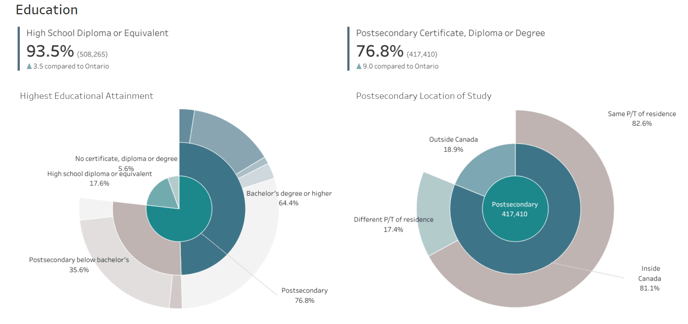
- The center of the sunburst chart typically represents the highest hierarchical level or the total dataset from which the analysis begins. This is your starting point for understanding the breakdown of the data.
- Each ring moving outward from the center represents a deeper level of detail within the dataset. As you move from the innermost to the outermost layers, you are essentially drilling down into more specific categories or subcategories of the initial data.
- Each segment of a ring represents a portion of the data related to its parent segment in the inner ring. The size of a segment shows the proportion of that category relative to its parent category. Larger segments indicate a larger proportion.
- Colors in a sunburst chart are often used to differentiate between categories and subcategories. Pay attention to the color legend if provided, as it will help you understand what each color represents.
- If the sunburst chart is interactive, you can hover over individual segments to get specific information about that data point, such as exact values, percentages, or other relevant details.
- Labels on a sunburst chart can appear inside or next to the segments. They typically denote what each segment represents. Due to space constraints, not all labels may be visible, particularly for smaller segments. Hovering or clicking on a segment might reveal its label if it isn't initially visible.
- To compare data across different categories, look at the segments' thickness across different rings. This can help you visually gauge the relative importance or size of different categories within the dataset.